I/O Summary 
The I/O Summary is different from other Summary windows
in two ways. First, the type of I/O objects that can be displayed are
broken out into sub-types. Each sub-type is displayed in its own tab page.
For example, there are tab pages for CAN I/O and Motor I/O. Secondly,
unlike other Summary windows, objects are represented as rows and attributes
are represented in columns.
Configuration Attributes: "Motor I/O" Tab Page
This window displays the I/O associated with motor objects.
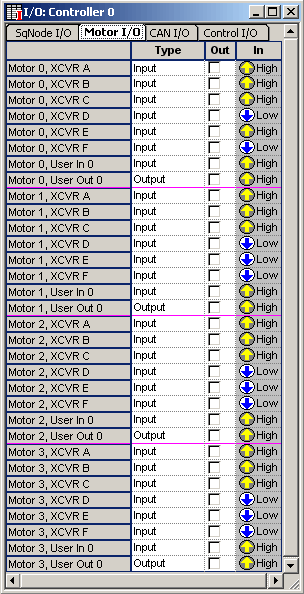
The number of I/O objects associated with a motor depends
on the type of SynqNet Node that the motor is mapped to. If the motor
is not mapped to a SynqNet Node, then it has no I/O. See Motor
I/O for more information.
Type – The choices for the types of I/O depend
on the type of SynqNet Node that the motor is mapped to.
Out – Value to write to the bit. Checked is
HIGH, unchecked is LOW.
In – Value read from the bit.
Configuration Attributes: "Control I/O" Tab Page
This window displays the I/O associated with control
objects.
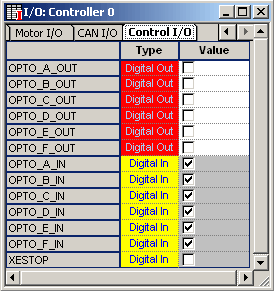
Type – The Control I/O are sorted by type. Each
type is color coded. The list below describes the I/O types.
| |
- Digital Out
(red) – Digital Output
- Digital In
(yellow) – Digital Input
|
Value – The Value attribute for an Input I/O
object is read-only. For Digital I/O, the value is represented as a checkbox.
When checked, it's HIGH. When unchecked, it's LOW.
Previous | Next
|


